Preparing for Making Tax Digital as a Small Business Owner
My Business Structure
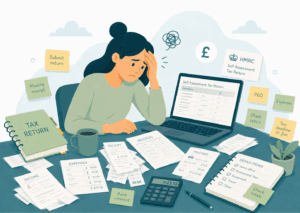
Preparing for Making Tax Digital has been one of those jobs I knew I needed to deal with, but kept putting off. If you’re self-employed or run a small business in the UK, maybe you’re also feeling the same way about Making Tax Digital.
This blog shares my own experience of getting prepared, including opening a business bank account, choosing MTD software and submitting my first update.
It's not tax advice. I am not an accountant or tax adviser. This is simply my own experience of getting ready for Making Tax Digital, in the hope that it may be useful for other small business owners in the UK who are trying to get their heads around the same thing.
I’ve been self-employed since April 2023. My set-up isn’t overly complicated, but I’m also in full-time PAYE employment.
This means I must wait for my P60 each year, then add my employment details into my tax return as well as my self-employment income and expenses.
It’s not life changingly difficult, but it can be a laborious and somewhat mind-numbing task.
How I Managed Things Before Making Tax Digital
Historically all my income and expenses went through my personal bank account, and I used QuickBooks to keep track of everything for my tax return.
I also use the free version of an app called Emma to keep an eye on my personal spending, but most business transactions were either regular invoices or software subscriptions, so I didn’t need to worry about tracking them too much.
Overall, it was fairly easy. Most of the transactions in the account were personal, so at the end of the year I would download everything into a spreadsheet, remove the personal transactions, and count up the business ones.
I use simplified expenses and only ever have a few business journeys in my car to account for, so it was manageable.
Getting Started with Making Tax Digital
When I realised I would need to prepare for Making Tax Digital, I started reading up on it and watching videos so I could understand what I needed to do.
I registered online with HMRC here:
Sign up for Making Tax Digital for Income Tax – GOV.UK
There are a lot of videos on YouTube about MTD, but I found this one particularly useful as it answers more of the questions I feel that real users will be asking:
The Initial Plan
At first, I assumed I would continue using QuickBooks, so when, at the start of April, QuickBooks emailed me to say my account was going to be changed to QuickBooks Sole Trader Plus, I decided to change it early so I could get a head start.
After following the instructions, I received an email saying my data was being transferred to QuickBooks Online, and that the last seven years of data had been moved across.
An Unexpected Change of Plan
When I logged in, I immediately knew it was not for me.
The data had not transferred, and in fact I could only see information from 12 April 2026 onwards, meaning all the notes and receipt photos I had ready for my tax return were gone.
I disliked the new set-up so much that I cancelled my direct debit, even though I’d already paid for the next year, and decided to take it as a sign to reassess how I was managing my business finances.
A New Plan
One thing that didn’t sit comfortably with me was the idea of allowing HMRC, even indirectly, to connect to my personal bank account.
That made me realise it was probably the right time to separate my business and personal finances properly.
Picking a Business Bank Account
I looked at a few business bank accounts, including Monzo, Starling and Tide, and I decided to go with Starling.
The main reason was that Starling includes Making Tax Digital and tax return functionality, which made it feel like a practical one-stop option for what I needed.
This isn’t to say that the others don’t include these, but it wasn’t obvious on their websites.
Connecting to HMRC’s Making Tax Digital Service
Connecting Starling to HMRC for Making Tax Digital was very straightforward. It is worth noting that this part has to be done online, rather than through the app.
Once I had opened the account, there were a couple of things I was unsure about:
What should I do with money I transferred in from my personal account as a starting balance?
What should I do about business transactions that had already gone through my personal account?
Thankfully, there was a simple way to handle this.
Adding Manual Payments to my MTD Record in Starling
The Making Tax Digital service within Starling allows you to add manual payments and categorise them as you go. The money I transferred into the account was categorised as capital introduced, and so won’t be counted as an income.
I couldn’t switch all of my subscription payments over straight away because I had to wait for my new debit card to arrive. This wasn’t a problem, and I was happy to make a slow transition between the two accounts.
Submitting my First Making Tax Digital Update Early
I decided that I would start submitting updates in May, even though the first mandatory update would not be due until August.
My thinking was simple. I would rather find any problems early, while there was no pressure, than wait until the deadline and realise I had misunderstood something.
The first thing I did was go through my QuickBooks transactions and manually add the relevant ones into my Starling Making Tax Digital account.
Categorising my Transactions
I used the guidance provided by Starling to help categorise the payments that had already gone through my new business account, and set up rules so that regular payments would be categorised automatically in future.
Then I realised that I had not changed the date on any of the manual payments I had added. They had all defaulted to today’s date – newbie mistake!
Luckily, the system made it easy to go back and edit them.
Tidying up Subscription Payments
I went through my 2025/2026 transactions to identify subscriptions that were still linked to my personal account, and changed them over to the new business account.
This was one of those jobs that was slightly annoying in the moment, but I knew it would make things much easier going forward.
Once all the relevant transactions had been copied over from QuickBooks, I pressed the button to submit the update, and immediately logged into my HMRC account to see how long it would take to show.
It was basically instant.
One thing I did notice is that it doesn’t clearly say that you have submitted an update.
However, under ‘Returns > View your current 2026 to 2027 return’, it showed my income and expenses for the year to date. That was the only sign that something had gone through.
Ironing Out Some Teething Problems
Then I almost fell off my chair.
My income was showing as roughly twice the amount I had submitted.
My first thought was that I had somehow submitted it twice, even though that didn’t even seem to be possible.
It turned out I hadn’t (phew!). HMRC was also showing my PAYE income, which was actually quite useful once I understood what I was looking at.
You can drill down into the income section and see how much you’ve received from each source.
This could be especially useful for people who have more than one self-employment income stream, as Making Tax Digital updates need to be submitted separately for each one.
Recording Expenses for Making Tax Digital
The next issue was my expenses.
They were only showing as about £800. For context, I subcontract work to two people, and since the start of April I had paid them around £3,000 between them.
The £800 appeared to be my personal allowance, with no other expenses showing in the way I expected.
I had categorised the subcontractor payments as “other” because Starling’s wording suggested that the staff category was not for subcontractors. Previously, I had always categorised those invoices as staff costs, so they were deducted from my income before tax was calculated.
For a moment, I honestly felt quite sick. I had a sudden fear that I had completely misunderstood something and that I would need to pay tax on that income as well.
I checked HMRC’s guidance and was relieved to find that staff costs can include subcontractors.
Expenses if you’re self-employed: Overview – GOV.UK
The important lesson for me was this: software suggestions are helpful, but they don’t replace understanding the HMRC categories for yourself. If you’re unsure, it’s always worth checking the official guidance or speaking to someone qualified.
I also took a screen print and kept it for my records – better safe than sorry!
I went back into Starling, updated the categories and resubmitted.
Resubmitting my Making Tax Digital Update
Nothing changed.
I was so confused that I doubted whether I had pressed the button properly, so I submitted it again. Yes, that means I submitted it three times.
While I’m not in a position to explain exactly how or why the system works the way it does, I eventually worked out what was happening.
The profit figure in Starling matched the profit figure in my HMRC Making Tax Digital account.
In other words, the expenses had already been accounted for before they appeared in the HMRC account. They just were not showing in the way I expected.
I can easily imagine this catching other people out, especially if they are expecting to see a full breakdown of every income and expense category.
Using Making Tax Digital to Plan my Business Finances
Before Making Tax Digital went live, I assumed the system might show me a rough calculation of tax due, but I thought it probably wouldn’t take my PAYE income into account.
I also assumed it wouldn’t be much help for planning, because I expected it to calculate everything at 20% and not properly reflect anything that moved into the higher tax threshold.
So I was pleasantly surprised to see that my PAYE information was included.
I have set myself a calendar reminder for the end of the month so I can check how soon after my PAYE payday the information updates, and will time my monthly MTD submissions accordingly.
My Initial Thoughts on Making Tax Digital
Having a dedicated business bank account was absolutely the right move for me.
I do not know how every Making Tax Digital service works, so I can only speak from my own experience. So far, I have found Starling easy to set up and easy to use.
The only slight downside is that you need both your phone and a desktop to use the Making Tax Digital section. The phone is needed to log in using a QR code.
There are a few things I wish were clearer in the HMRC account:
I wish it showed when updates had been made within the quarterly period – a submissions log with dates and times would be great.
I really like that it already includes my PAYE income.
I also wish it showed a clearer breakdown of income, taxable income, non-taxable income, allowable expenses, disallowed expenses and profit.
Now that I know what I am looking at, it makes more sense, but I do think this could confuse people.
Final Thoughts on MTD (for now)
Submitting the update itself was much easier than I expected, especially with a dedicated business bank account that links to Making Tax Digital.
I have only set up a few rules so far, but most of my payments are regular ones that will usually fit into the same category.
Going forward, I think the process will mainly involve:
- Checking the previous month’s transactions
- Making sure everything has been categorised correctly
- Checking that nothing business-related has gone through my personal account
- Submitting the update
I will still be using the Emma app to help track my personal account, which should help me spot anything that has gone through the wrong account.
The biggest lesson for me is that starting early was worth it.
It meant I could make mistakes, question things, check the guidance and get used to the system before the first mandatory deadline.
For any small business owner who is preparing for Making Tax Digital, my personal advice would be to give yourself more time than you think you need.
Not because submitting the update is necessarily difficult, but because understanding what you are looking at can take a little while.
Need help getting your small business systems organised?
If you need help getting your small business systems organised, you can also read more about my small business support services or get in touch here if you would like practical support.